What Is Business Automation? 5 Proven Areas Where SMBs See Real ROI
Learn how automation transforms everyday business processes into faster, smarter, and more profitable operations.
Book a Demo session
Share your details and our consultants will help you choose the right strategy, tools, and solutions to accelerate your digital growth.
Roughly 60–70% of businesses worldwide had deployed some form of automation as of early 2026. Among large enterprises, that number reaches 84%. SMBs are accelerating — but the performance gap between early movers and those still running on manual workflows is widening every quarter.
This blog breaks down what business automation actually means operationally, the 5 areas where SMBs are generating measurable returns, and how to avoid the implementation mistakes that cause most automation projects to stall. If you are evaluating business automation services for the first time — or rethinking where to start — this is the data-grounded starting point.
What Is Business Automation?
Business automation — commonly called business process automation (BPA) — is the use of software to handle recurring, rule-based tasks that would otherwise require manual effort. It covers the spectrum from a single automated email trigger to a fully connected business automation workflow linking sales, finance, HR, and operations into one operational system.
The McKinsey Global Institute estimates that 51% of current employee tasks are automatable using technology that already exists today. That figure does not describe some distant future — it describes the present gap between what most SMBs are doing and what is already achievable.
Modern automation covers four distinct layers:
→ Rule-based automation — invoice approvals, leave routing, scheduled report generation
→ AI-powered automation — document classification, lead scoring, anomaly detection in finance
→ Workflow automation — multi-step processes that span departments and require conditional logic
→ Integration automation — connecting ERP, CRM, HRMS, and support tools so data flows without manual transfer
Why Businesses Automate: What the Data Says
94% of automation adopters cite time-saving as their primary driver — not cost reduction, not headcount. That reframes the business case entirely. Automation is first a capacity problem.
70% of business leaders spend between 45 minutes and 3 hours daily on tasks that are directly automatable. At 250 working days per year, that is between 187 and 750 hours per person in leadership — time that could otherwise go toward decisions, clients, or growth.
750 leadership hours lost per year — per person — to tasks that existing automation technology can already handle. That is not an operations issue. That is a strategic capacity problem.
Areas Where SMBs Are Seeing Real ROI
Most businesses automate in the wrong order. They start with marketing tools because they are visible and easy to justify — while finance, HR, and operations continue running on disconnected systems where the actual manual burden sits. The five areas below are ranked by measurable operational impact, not visibility.
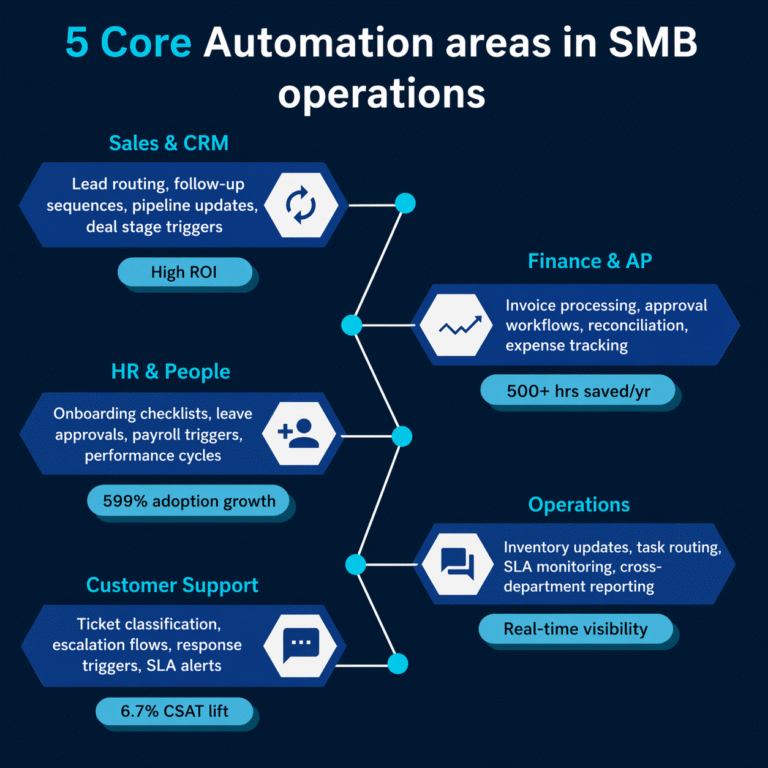
1. Finance & Accounts Payable — 500+ Manual Hours Recovered Per Year
Invoice processing automation eliminates over 500 manual hours per year in finance teams alone. Approval workflows that previously ran on email — taking days to complete — compress to hours. Reconciliation, expense tracking, and payment approvals all become rule-driven, auditable, and accurate.
For SMBs handling between 50 and 500 invoices per month, this is typically the highest-ROI automation investment available. It also reduces the downstream error rate that creates cash flow and compliance problems at audit time.
2. Sales & CRM Workflow Automation — 82% of Sales Time Recovered for Actual Selling
Automated lead routing, follow-up sequences, and deal stage triggers recover the majority of sales team time currently spent on administrative tasks. Salesforce data puts this recovery at approximately 82% when CRM workflows are properly configured — time redirected to direct client engagement.
Properly configured sales automation also closes the gap that grows fastest in scaling teams: leads falling through because no one followed up within the right window.
3. HR & People Operations — 599% Adoption Growth
HR automation has seen 599% adoption growth in recent years. Onboarding checklists, leave approval routing, payroll triggers, and performance cycle management are all repetitive and rule-based — and all carry a real cost when handled manually at scale.
For any business in a hiring phase, this is where automation delivers the fastest visible impact. Onboarding failures are immediately felt by both the new hire and the team absorbing them.
4. Operations & Cross-Department Reporting — Real-Time Visibility
Inventory updates, task routing, SLA monitoring, and cross-department reporting are the operational backbone of most SMBs — and the area where manual processes create the most friction for leadership. Real-time dashboards connected to automated data flows replace the weekly manual MIS consolidation that typically consumes entire afternoons.
This is where business consultation is most valuable: the workflow design that determines what gets measured, how it flows, and where human judgment is still required cannot be outsourced to a software vendor. It requires someone who understands both the business and the system architecture.
5. Customer Support Automation — 6.7% CSAT Improvement
Ticket classification, escalation flows, response triggers, and SLA alerts keep support queues moving without requiring constant manual triage. Organisations that have implemented support automation report a 6.7% improvement in customer satisfaction scores — not because humans are removed, but because the right tickets reach the right people faster.
The Three Mistakes That Cause Automation Projects to Fail
Automation failure is rarely a technology problem. It is almost always a process problem that the technology then amplifies at scale.
Automating a broken process does not fix it. It produces faster errors. The sequence that works: Audit the process → Redesign the workflow → Then automate. |
Mistake 1: No Process Audit Before Implementation
Teams reach for tools before they understand what they are automating. The output is a workflow that replicates existing inefficiencies at higher speed. A process audit — mapping current-state workflows, identifying bottlenecks, and defining the desired future state — has to come before any platform decision.
Mistake 2: Tool Selection Before Workflow Design
Selecting a business automation tool before defining the workflow it needs to support is backwards. The tool should serve the process, not define it. This is exactly where structured business consultation makes the difference: an experienced implementation partner designs the workflow first, then matches it to the right platform.
Mistake 3: Automating the Wrong Processes First
Most organisations start with what is visible rather than what is high-impact. The correct sequencing is to start with the highest-volume, highest-error-rate processes — typically finance and HR — not the most externally visible ones. Marketing automation is easy to justify and quick to deploy. But it rarely addresses the manual burden that is actually limiting growth.
Leading Business Automation Tools and Companies in 2026
The business automation market has matured into a clear two-tier structure: enterprise-scale platforms built for large, complex environments, and mid-market suites that deliver comparable automation capabilities at SMB-accessible costs.
Global Enterprise Platforms
→ Automation Anywhere — enterprise RPA and agentic AI, recognised in the Gartner Magic Quadrant for seven consecutive years; strong in finance and IT operations at large scale.
→ UiPath — process automation for complex enterprise environments, widely adopted in manufacturing, banking, and healthcare.
→ SS&C Blue Prism — ranked highly for secure, compliant, and robust automation, with a particular focus on stability in heavily regulated industries such as financial services and insurance.
→ IBM — a major player through its IBM Robotic Automation Platform and Watson AI, focusing on intelligent automation and hybrid cloud solutions that blend AI with existing enterprise infrastructure.
→ Microsoft Power Automate — embedded within Microsoft 365, practical for organisations already running on that stack; strong for document workflows and cross-app triggers.
→ ServiceNow — IT and service operations automation for larger organisations with complex ITSM requirements.
SMB-Accessible Platforms — AIVORA Techlabs Implementation Stack
→ Zoho — end-to-end suite covering CRM, finance, HR, and operations with strong native automation capabilities at SMB cost. AIVORA implements Zoho across the full stack.
→ Odoo ERP — open-source ERP with modular automation across sales, inventory, accounting, and HR. AIVORA’s Odoo implementations cover full workflow configuration, not just licensing.
→ Monday.com — workflow and project automation, particularly effective for cross-department task routing, approvals, and SLA tracking.
AIVORA Techlabs implements across all three SMB platforms and goes further: the team builds in-house AI-powered tools and custom software tailored to specific operational workflows that off-the-shelf platforms do not cover. This includes custom automation logic, bespoke integrations between systems, and proprietary workflow tools built on AIVORA’s software development capability. For SMBs with processes that do not fit a standard platform, this is the difference between a workaround and a solution that actually works.
Unlike platform vendors who license software, AIVORA operates as a business automation company that owns the full implementation — from process audit through live deployment — and continues as a long-term operations partner through managed services.
What Business Consultation Adds to Automation Projects
There is a meaningful difference between installing automation software and building an automated business. The software is the mechanism. The strategy—what to automate, in what order, and which systems to connect— requires business consultation expertise.
AIVORA Techlabs takes a structured consulting approach to automation: we start with a process audit, then recommend a platform, and sequence implementation to deliver measurable returns at each phase rather than a single large deployment with a long payback period.
This matters specifically for SMBs, where cash flow and operational continuity cannot sustain a months-long system overhaul. A phased approach — CRM and sales automation first, then finance, then HR — allows a business to start seeing ROI within weeks of project start while subsequent phases are designed in parallel.
The Real Cost of Doing Nothing
The cost of automation delay is not just operational inefficiency. It is a compounding competitive disadvantage.
Companies that automate finance and CRM workflows first eliminate error rates and processing delays that their competitors still carry. The gap widens each quarter. By the time a laggard starts an automation programme, the early movers have already redirected recovered capacity into hiring, client growth, or reinvestment.
→ 84% of large enterprises have already implemented automation solutions
→ SMB adoption is accelerating — driven by falling platform costs and rising talent costs
→ Finance and HR automation returns are measurable within the first quarter of deployment
→ The average SMB leadership team loses 187–750 hours per person per year to automatable tasks
How to Start: A Practical Automation Roadmap for SMBs
The goal of a first automation programme is not to automate everything. It is to prove measurable impact in one area, build internal confidence, and create the operational foundation for broader rollout.
Phase 1 — Audit (Weeks 1–2)
Map current workflows in finance, sales, HR, and operations. Identify the top three processes by volume and error rate. Quantify the manual hours consumed per week. This becomes the ROI baseline that all future measurements are anchored to.
Phase 2 — Design (Weeks 3–4)
Redesign the workflow before selecting a tool. Define the desired future state: what triggers the process, which steps are fully automated, where human judgment is still required, and what the output looks like. Only then match the workflow to the right platform.
Phase 3 — Deploy (Weeks 5–10)
Implement the first automation with a controlled rollout. Test against the current-state baseline. Measure processing speed, error rate, and output quality. Go live with a rollback plan in place.
Phase 4 — Scale
Use the first deployment as an internal proof of concept. Present the metrics. Build the business case for the next automation area. The second phase is always faster because the methodology is established and the team has seen it work. AIVORA Techlabs managed services team supports ongoing optimisation at each stage.
Conclusion
Business automation is not a future-state initiative. For SMBs, it is a present-state operational requirement. The data is clear on where the ROI sits — finance, HR, CRM, and operations — and equally clear on what causes programmes to fail. AIVORA Techlabs provides end-to-end business automation services built on Zoho, Odoo, and Monday.com, supported by structured business consultation and in-house AI and custom software development for workflows that standard platforms do not cover. If your business is still running critical operations on manual processes or disconnected tools, the gap is measurable — and it is growing.
FAQs
Q1. What is the difference between business automation and business process automation (BPA)?
The two terms are often used interchangeably, and in most practical contexts they mean the same thing. Business automation is the broader umbrella — it covers any use of technology to remove manual effort from recurring tasks. Business process automation (BPA) is a subset that specifically refers to automating structured, multi-step workflows that span systems or departments. In practice, if you are automating a single task in isolation, that is task automation. If you are automating the entire invoice-to-payment cycle including approvals, exceptions, and reconciliation, that is BPA. For SMBs, the distinction matters mostly when evaluating tools: some platforms handle isolated tasks well, while others are built for end-to-end process automation.
Q2. Is business automation suitable for small businesses or only for larger companies?
Business automation is now as accessible to a 20-person SMB as it is to a 500-person enterprise, provided the right platforms are used. Enterprise tools like UiPath and Automation Anywhere are built for complex, large-scale environments and carry the cost and implementation complexity to match.
Q3. What is the difference between business process automation (BPA) and robotic process automation (RPA)?
RPA is a specific technology within the broader category of business process automation. RPA software uses bots to mimic human interactions with user interfaces — clicking buttons, entering data, copying information between systems — without requiring those systems to be integrated at an API level. BPA is the wider discipline: it includes RPA, but also covers workflow engines, integration platforms, AI-powered automation, and custom-built tools. For SMBs, RPA is most useful when automating tasks that involve legacy systems with no API. For most modern SMB environments, workflow automation through platforms like Zoho or Odoo is more practical than standalone RPA.
Q4. Why do many business automation projects fail, and how can SMBs avoid that?
The three most common failure modes are: implementing without a prior process audit, selecting tools before the workflow is designed, and automating processes that are already broken. Automation does not fix a poorly designed process — it speeds it up. The businesses that see strong automation ROI consistently follow the same sequence: audit the current-state process, identify where the manual burden and error rate are highest, redesign the workflow for the desired future state, and only then select and configure the tool. Skipping the first two steps is the most reliable way to build an automation that requires constant manual intervention to function correctly.
Book Your Free Consultation
Share your details and our consultants will help you choose the right strategy, tools, and solutions to accelerate your digital growth.
Get the latest
Business Growth
& Insights
Strategies. Trends. Insights.
Everything to grow your business.
✔ New stories every week
BUSINESS AUTOMATION
Business Automation: 5 Processes SMBs Should Fix Before Their Next Hire
Most growing businesses hire to solve chaos. Here’s what actually works.
AIVORA Techlabs on Medium